Subscription Documents
Most offerings require the investor to sign a subscription agreement for each trade. TransactAPI can prepare and send those agreements through its DocuSign integration, filled in with the investor's account and trade data, and it records the signing status on the trade. If you collect signatures some other way, you can upload the signed documents to the trade instead. Do this step after you create the trade, and before or alongside collecting payment.
Before You Start
- You have a trade
CREATEDfor the account. See Create the Trade. Keep thetradeId,accountId, andofferingId. - For DocuSign signing:
- Your DocuSign account is linked in the Transact Portal under Subscription Document Credentials, and DocuSign subscription documents are enabled for your client. Contact North Capital if you're not sure.
- Your subscription agreement is saved as a DocuSign template. The investor's signer role must be named
PrimaryParty. For joint accounts, add aSecondaryPartyrole for the second account holder.
- You have registered webhooks for
updateDocuSignStatusso you know when a document is signed.
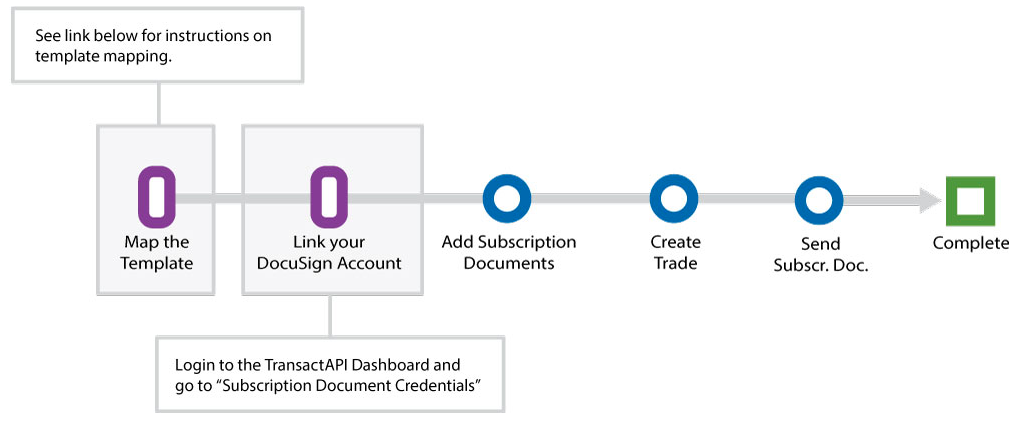
Steps
Steps 1–4 use DocuSign. If you collect signatures outside TransactAPI, skip to step 5.
1. Find the DocuSign template
Call fetchSubscriptionDocuments to list the templates in your linked DocuSign account. It takes no parameters beyond authentication.
curl -X POST "$TAPI_HOST/v3/fetchSubscriptionDocuments" \
  -H "Authorization: Bearer $TAPI_CLIENT_ID:$TAPI_API_KEY"
{
  "statusCode": "101",
  "statusDesc": "Ok",
  "document_details": [
    {
      "templateId": "11111111-2222-3333-4444-555555555555",
      "name": "ABC Fund Subscription Agreement",
      "pageCount": "12"
    }
  ]
}
Keep the templateId and name of your subscription agreement.
2. Attach the template to the offering
Call addSubscriptionsforOffering once per offering. file_name takes the form templatename0=<templateId>--<name>. To attach more templates, add &templatename1=...; each attached template is sent with every trade.
curl -X POST "$TAPI_HOST/v3/addSubscriptionsforOffering" \
  -H "Authorization: Bearer $TAPI_CLIENT_ID:$TAPI_API_KEY" \
  -d offeringId=12345 \
  --data-urlencode "file_name=templatename0=11111111-2222-3333-4444-555555555555--ABC Fund Subscription Agreement"
{
  "statusCode": "101",
  "statusDesc": "Ok",
  "document_details": [
    {
      "templateNameID": "67890",
      "templateName": "ABC Fund Subscription Agreement",
      "offeringId": "12345"
    }
  ]
}
The offering's templates are now listed by getSubscriptionsforOffering.
3. Send the documents for signature
There are two ways to deliver the envelope. Choose one per trade.
By DocuSign email. Call sendSubscriptionDocument with the offeringId, accountId, and tradeId. TransactAPI builds one envelope per template, pre-fills it with the investor's data, and DocuSign emails it to the primary party, and to the secondary party for a joint account.
curl -X POST "$TAPI_HOST/v3/sendSubscriptionDocument" \
  -H "Authorization: Bearer $TAPI_CLIENT_ID:$TAPI_API_KEY" \
  -d offeringId=12345 \
  -d accountId=A12345 \
  -d tradeId=100012345
{
  "statusCode": "101",
  "statusDesc": "Ok",
  "document_details": "Subscription Document Sent Successfully"
}
Call it once per trade. If the investor needs the email again, call resendSubscriptionDocuments with the same three fields.
Embedded in your platform. Call sendSubscriptionDocumentClient with the same fields. It creates the envelope for the primary party and returns a DocuSign signing URL instead of sending an email.
curl -X POST "$TAPI_HOST/v3/sendSubscriptionDocumentClient" \
  -H "Authorization: Bearer $TAPI_CLIENT_ID:$TAPI_API_KEY" \
  -d offeringId=12345 \
  -d accountId=A12345 \
  -d tradeId=100012345
{
  "statusCode": "101",
  "statusDesc": "Ok",
  "document_details": {
    "url": "https://demo.docusign.net/Signing/StartInSession.aspx?t=00000000-0000-0000-0000-000000000000"
  }
}
Open document_details.url for the investor right away, in a new window or an iframe. DocuSign signing URLs are short-lived and can be used only once. When the offering has more than one template, only the last envelope's URL is returned, so use a single template with this method.
4. Track the signing status
When the envelope's status changes, TransactAPI updates the trade and sends the updateDocuSignStatus webhook. The webhook carries the tradeId and esignstatus:
esignstatus | Meaning |
|---|---|
NOTSIGNED | Sent and waiting for the investor. |
SIGNED | The investor completed signing. |
DECLINED | The investor declined to sign. |
VOIDED | The envelope was voided in DocuSign. |
Wait for SIGNED before you treat the subscription as complete. With embedded signing, an investor who leaves the session without finishing leaves the document NOTSIGNED.
To check the status without a webhook, read the trade's esignStatus from GET /v3/trades. To get the signed copies, call getTradeSignedDocument with the tradeId. It returns only signed documents, and returns code 214 until at least one is signed.
curl -X POST "$TAPI_HOST/v3/getTradeSignedDocument" \
  -H "Authorization: Bearer $TAPI_CLIENT_ID:$TAPI_API_KEY" \
  -d tradeId=100012345
{
  "statusCode": "101",
  "statusDesc": "Ok",
  "SignedDocumentDetails": [
    {
      "documentId": "aaaaaaaa-bbbb-cccc-dddd-eeeeeeeeeeee",
      "templateName": "11111111-2222-3333-4444-555555555555--ABC Fund Subscription Agreement",
      "esignstatus": "SIGNED",
      "documentUrl": "https://api-sandboxdash.norcapsecurities.com/admin_v3/Upload_documentation/uploadDocument/..."
    }
  ]
}
documentId is the DocuSign envelope ID. Use documentUrl to download the signed copy.
5. Upload documents to the trade (without DocuSign)
If investors sign with another e-signature provider or on paper, or you need to attach other documents to the trade, upload them with uploadTradeDocument. The request must be multipart/form-data. Files must be PDF, JPG, JPEG, or PNG, and larger than 1 KB. Send one file per request.
curl -X POST "$TAPI_HOST/v3/uploadTradeDocument" \
  -H "Authorization: Bearer $TAPI_CLIENT_ID:$TAPI_API_KEY" \
  -F tradeId=100012345 \
  -F "documentTitle=documentTitle0=Subscription Agreement" \
  -F "file_name=filename0=subscription-agreement.pdf" \
  -F "userfile0=@subscription-agreement.pdf"
{
  "statusCode": "101",
  "statusDesc": "Ok",
  "document_details": "Document has been uploaded Successfully"
}
To list a trade's uploaded documents, call getTradeDocument with the tradeId. Each item has a documentid, documentTitle, and a documentUrl for download. The documentUrl expires after a few minutes, so request it again when you need it. Uploaded documents don't change the trade's esignStatus.
Webhooks
These methods send a webhook in this step. See the Trades method reference for each payload.
updateDocuSignStatus: a subscription document's DocuSign status changes. The payload carriestradeId,documentId,templateId, andesignstatus.uploadTradeDocument: documents are uploaded to a trade. The payload carries thetradeId.updateTradeDocArchivestatus: an uploaded trade document is archived or unarchived.
Common Errors
See Error Codes for the full list.
| Code | Cause |
|---|---|
106 | A required field is missing. For uploadTradeDocument, the file is missing, smaller than 1 KB, or file_name contains &. |
135 | The account has no active primary party link. |
188 | sendSubscriptionDocument or sendSubscriptionDocumentClient was called with a tradeId that doesn't exist for your client. getTradeSignedDocument and uploadTradeDocument return 189 in this case. |
214 | DocuSign rejected the envelope, and statusDesc carries DocuSign's message, which usually points to a template role or field problem. getTradeSignedDocument also returns 214 when no document on the trade is signed yet. |
404 | No templates are attached to the offering (Subscription documents not found), or DocuSign subscription documents aren't enabled for your client (Please check TAPI client configuration.). |
Next
With the trade created and its documents out for signature, go to Collect Payment.