Create the Trade
With your investors onboarded and qualified, you can build the subscription process. A trade records an account's commitment to buy a number of units in an offering. Creating a trade doesn't move money: it reserves the units and sets the amount the investor owes. You collect the funds in the next step, Collect Payment, and the trade's status follows the money from there.
Before You Start
- The offering exists and has an approved escrow account. See Set Up an Offering. Keep the
offeringId. - The investing account exists and has an active primary party link. See Onboard Investors. Keep the
accountId. - Your platform has finished the qualification checks it requires, such as KYC/AML, suitability, and accreditation. See Qualify Investors.
createTradedoesn't check qualification statuses, so apply your eligibility rules before you call it. - You have registered webhooks for the trade methods listed under Webhooks.
Steps
1. Create the trade
Call createTrade to place the account's order against the offering.
curl -X POST "$TAPI_HOST/v3/createTrade" \
  -H "Authorization: Bearer $TAPI_CLIENT_ID:$TAPI_API_KEY" \
  -d offeringId=12345 \
  -d accountId=A12345 \
  -d transactionType=ACH \
  -d transactionUnits=100 \
  -d createdIpAddress=10.0.0.9
| Field | Required | Notes |
|---|---|---|
offeringId | Yes | Must be numeric. |
accountId | Yes | The investing account. The trade is recorded against the account's primary party. |
transactionType | Yes | The payment method. See Transaction types. |
transactionUnits | Yes | A positive number that doesn't exceed the offering's remaining units. The trade amount is the offering's unit price × transactionUnits, plus fees, and must fall between the offering's minimum and maximum amounts. |
fees | No | A non-negative amount added to the trade amount. |
createdIpAddress | No | The investor's IP address, stored on the trade. |
field1, field2, field3 | No | Custom fields for your own references. |
RRApprovalStatus, PrincipalApprovalStatus | No | Default to Pending. |
closeId | No | Groups the trade into a closing. |
{
  "statusCode": "101",
  "statusDesc": "Ok",
  "purchaseDetails": [
    true,
    [
      {
        "tradeId": "100012345",
        "transactionId": "54321",
        "transactionAmount": "1000.000000",
        "transactionDate": "2026-01-15 10:30:00",
        "transactionStatus": "CREATED",
        "RRApprovalStatus": "Pending",
        "PrincipalApprovalStatus": "Pending",
        "closeId": null,
        "eligibleToClose": "no"
      }
    ]
  ]
}
Keep the tradeId from purchaseDetails[1][0]. Every later step (subscription documents, payments, status updates) uses it.
Transaction types
transactionType isn't checked against a fixed list. TransactAPI stores it uppercased, with spaces and underscores removed, so credit card is stored as CREDITCARD. Use one of these values so the payment step and the Transact Portal handle the trade correctly:
| Value | Payment method |
|---|---|
ACH | ACH transfer from the investor's linked bank account |
WIRE | Wire transfer |
CHECK | Check |
CREDITCARD | Credit card |
IRA | Payment from an IRA custodian |
TBD | Not decided yet |
If the investor changes the payment method, call updateTradeTransactionType while the trade is still CREATED.
2. Confirm the trade
Read the trade back from GET /v3/trades to confirm the trade or to reconcile it later. Filter by tradeId or accountId (see Working with Lists).
curl -X GET "$TAPI_HOST/v3/trades" \
  -G \
  -H "Authorization: Bearer $TAPI_CLIENT_ID:$TAPI_API_KEY" \
  --data-urlencode "filter[tradeId]=100012345"
{
  "statusCode": "101",
  "statusDesc": "Ok",
  "trades": [
    {
      "tradeId": "100012345",
      "accountId": "A12345",
      "offeringId": "12345",
      "partyId": "P12345",
      "transactionType": "ACH",
      "totalShares": "100.000000",
      "totalAmount": "1000.000000",
      "tradeStatus": "CREATED",
      "esignStatus": "NOTSIGNED",
      "archived": "0"
    }
  ],
  "pagination": { "totalRecords": 1, "startIndex": 0, "endIndex": 0 }
}
Use tradeStatus to track the trade through the statuses below, and esignStatus to track its subscription documents.
3. Edit the units (optional)
To change the number of units before the trade settles, call editTrade with accountId, offeringId, tradeId, and the new shares. The trade must be CREATED or FUNDED. The new unit count must fit within the offering's remaining units.
curl -X PUT "$TAPI_HOST/v3/editTrade" \
  -H "Authorization: Bearer $TAPI_CLIENT_ID:$TAPI_API_KEY" \
  -d accountId=A12345 \
  -d offeringId=12345 \
  -d tradeId=100012345 \
  -d shares=150
{
  "statusCode": "101",
  "statusDesc": "Ok",
  "TradeFinancialDetails": {
    "tradeId": "100012345",
    "shares": "150",
    "sharePrice": 1500,
    "totalShares": "10000.000000",
    "remainingShares": "8850.000000",
    "closeId": null
  }
}
sharePrice is the trade's new total value (unit price × shares). totalShares and remainingShares describe the offering, not the trade.
4. Cancel the trade (optional)
If the investor withdraws before paying, call deleteTrade with the accountId and tradeId. The trade must be CREATED. A credit card trade can't be canceled while its card payment is Pending or Submitted. The trade isn't removed: its status changes to CANCELED and it's archived. The errDesc field is optional and records a reason.
curl -X POST "$TAPI_HOST/v3/deleteTrade" \
  -H "Authorization: Bearer $TAPI_CLIENT_ID:$TAPI_API_KEY" \
  -d accountId=A12345 \
  -d tradeId=100012345 \
  -d errDesc="Investor withdrew"
{
  "statusCode": "101",
  "statusDesc": "Ok",
  "tradeDetails": [
    { "partyId": "P12345", "offeringId": "12345", "orderStatus": "CANCELED" }
  ]
}
A trade that has already been funded can't be canceled this way. To return funds to an investor, see Investor Refunds and Returns.
Trade Statuses
A trade's status tracks the investor's money, from commitment through escrow to the issuer. Payment processing has its own statuses, described in Collect Payment.
| Status | Meaning |
|---|---|
CREATED | The trade exists and funds haven't reached escrow yet. |
FUNDED | Funds have been received in escrow. |
UNWIND PENDING | Funds were received in escrow and a return to the investor is pending. |
UNWIND SETTLED | Funds were received in escrow and returned to the investor. |
SETTLED | Funds have been released from escrow to the issuer. |
CANCELED | The investor withdrew before funds reached escrow. Set by deleteTrade. |
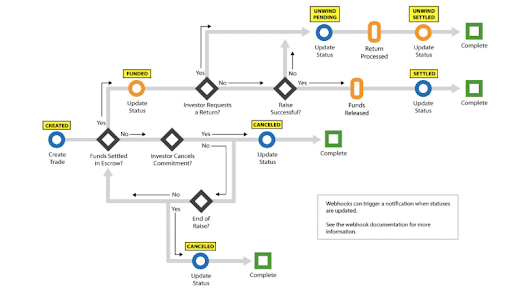
Statuses after CREATED change as payments settle and as you or North Capital call updateTradeStatus. Closing trades and marking them SETTLED is covered in Settle and Manage.
Webhooks
These methods send a webhook when they run in this step. See the Trades method reference for each payload.
createTrade: a trade is created. The payload carries thetradeIdandtransactionStatus.editTrade: a trade's unit count is edited.updateTradeTransactionType: a trade's payment method changes.deleteTrade: aCREATEDtrade is canceled.updateTradeStatus: a trade's status changes, for example toFUNDEDorSETTLED.
Common Errors
See Error Codes for the full list.
| Code | Cause |
|---|---|
106 | A required field is missing, offeringId or transactionUnits isn't numeric, or the amount falls outside the offering's minimum or maximum. The Error(s) field names the problem. |
135 | The account doesn't exist, isn't active, or has no active primary party link. |
137 | The offering has no approved escrow account. |
163 | The offering doesn't have enough remaining units for the requested amount. |
777 | The offering is not accepting investments because its escrow account has been closed. |
190 | deleteTrade or updateTradeTransactionType was called on a trade that isn't CREATED, or editTrade on one that isn't CREATED or FUNDED. |
Next
If the offering uses subscription agreements, send them for signature in Subscription Documents. Otherwise, go to Collect Payment.