Setting Up Encrypted Webhooks
Before you begin
Most integrations do not need payload encryption. Webhook endpoints are required to use HTTPS, and North Capital verifies the endpoint's certificate on every delivery.
To identify North Capital traffic at a firewall or WAF, the preferred approach is the User-Agent and X-NC-Token headers described under Identifying webhook traffic from North Capital. Leave the secret key blank in the TAPI Portal to receive payloads as standard form-encoded fields.
1. Generate a Secret Key
Key generation
This guide outlines a common method for generating a cryptographically secure secret key. Technically the secret key can be any 32-character string. Using a cryptographically secure string helps ensure that the encryption cannot be cracked.
Generate a secure 32-character secret key:
This command generates a 32-character hexadecimal string representing 16 bytes of random data.
Example output:
Without a command line, a password manager such as 1Password or Bitwarden will generate one. Choose the random password type, set the length to 32 characters, and save the result in the same vault as the rest of your credentials. The value is generated in the app rather than on a server.
The RANDOM.ORG password generator is a further option and caps at 32 characters. The value is created on RANDOM.ORG's servers and sent to your browser, and RANDOM.ORG advises against using an online generator for highly sensitive values, so prefer one of the options above where you can.
Secret key must be exactly 32 characters
The key is used directly as the AES-256 key. It is not Base64-decoded or hashed first, so the value saved in the TAPI Portal and the value used by your receiver must match character for character.
A Base64-encoded 32-byte key is 44 characters and will not work: only its first 32 characters are used. Use a 32-character key such as the hexadecimal string above. Keys shorter than 32 characters are padded with *.
2. Set Up Secret Key in TAPI Portal
- Log in to the TAPI Portal.
- Go to Administrative > Update Webhook Encryption Key, or navigate directly to
/admin_v3/index.php/client/administrative/updatewebhook.
 3. Select Update Encryption Key. 4. Enter the generated secret key, all 32 characters from the previous step. The field accepts only a 32-character value.
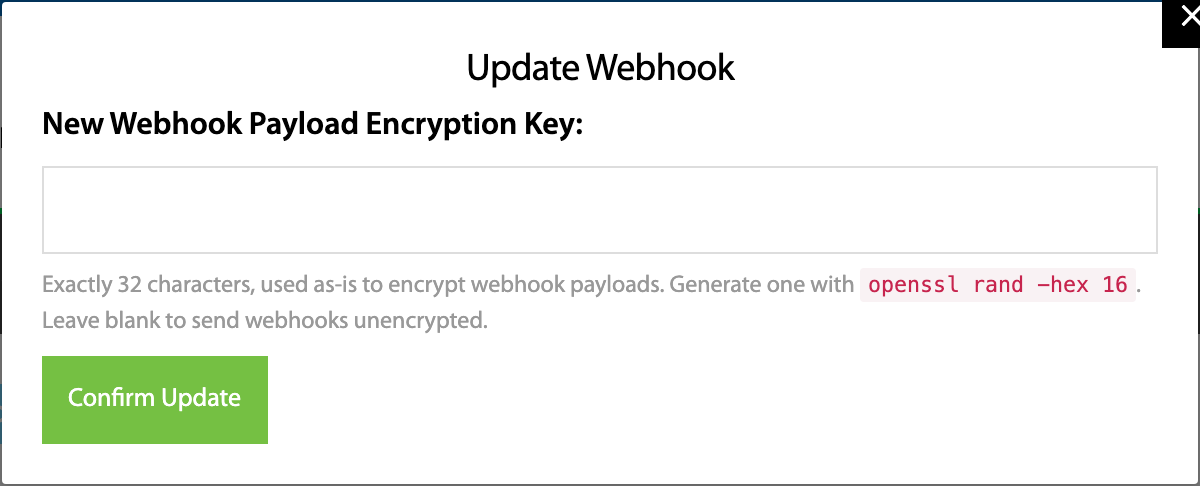 5. Select Confirm Update.
This step ensures that TAPI will use this key to encrypt webhook payloads.
3. Node.js Server (Receiver) Setup
This example uses the Node.js crypto library. You can find more information on how to use this library at:\ https://nodejs.org/api/crypto.html
Request format
Webhooks are delivered as POST requests with a content type of application/x-www-form-urlencoded. The encrypted payload is a single form field named params. A + in the Base64 value is percent-encoded as %2B by form encoding, so a standard body parser returns the Base64 string ready to decode.
No custom character encoding is applied. Receiving code that replaces plusencr with + before decoding will corrupt the payload.
3.1 Store the Secret Key
Store the secret key securely on your Node.js server. For example, you might save it in an environment variable or a secure configuration file.
3.2 Decryption Function
Use the following Node.js function to decrypt incoming webhook payloads:
const crypto = require('crypto');

// Retrieve the secret key from your secure storage
const secretKey = process.env.WEBHOOK_SECRET_KEY; // or read from a secure config file

function decryptWebhookData(encryptedData) {
  const decodedData = Buffer.from(encryptedData, 'base64');

  const iv = decodedData.slice(0, 16);
  const encrypted = decodedData.slice(16);

  // Create decipher
  const decipher = crypto.createDecipheriv('aes-256-cbc', secretKey, iv);

  // Decrypt
  let decrypted = decipher.update(encrypted);
  decrypted = Buffer.concat([decrypted, decipher.final()]);

  // Parse the decrypted data
  const decodedString = decrypted.toString('utf8');
  const parsedData = {};
  decodedString.split(', ').forEach((pair) => {
    const [key, value] = pair.split('=');
    parsedData[key] = decodeURIComponent(value);
  });

  return parsedData;
}
3.3 Usage in Express.js
Set up a route to handle incoming webhooks:
const crypto = require('crypto');
const express = require('express');
const morgan = require('morgan');

const app = express();
const port = process.env.PORT || 3000;

app.use(morgan('combined'));
app.use(express.json());
app.use(express.urlencoded({ extended: true }));

const secretKey = process.env.WEBHOOK_SECRET_KEY;

function decryptWebhookData(encryptedData) {
  const decodedData = Buffer.from(encryptedData, 'base64');
  const iv = decodedData.slice(0, 16);
  const encrypted = decodedData.slice(16);

  // Create decipher
  const decipher = crypto.createDecipheriv('aes-256-cbc', secretKey, iv);

  // Decrypt
  let decrypted = decipher.update(encrypted);
  decrypted = Buffer.concat([decrypted, decipher.final()]);

  // Parse the decrypted data
  const decodedString = decrypted.toString('utf8');
  const parsedData = {};
  decodedString.split(', ').forEach((pair) => {
    const [key, value] = pair.split('=');
    parsedData[key] = decodeURIComponent(value);
  });

  return parsedData;
}

app.get('/', (req, res) => {
  console.log(req.params);
  res.send('Hello World!');
});

app.post('/', (req, res) => {
  console.log(req.body);

  const decryptedData = decryptWebhookData(req.body.params);
  console.log('Decrypted webhook data:', decryptedData);
  res.send('Received webhook!');
});

app.listen(port, () => {
  console.log(`Listening for webhooks on port ${port}`);
});
4. Security Considerations
- Keep the secret key confidential and secure.
- Use HTTPS for all webhook communications.
- Regularly rotate the secret key by generating a new one and updating it in both the TAPI Portal and your Node.js server.
5. Troubleshooting
If you encounter decryption errors:
- Ensure the secret key in your Node.js server matches the one entered in the TAPI Portal, character for character.
- Confirm the key is exactly 32 characters and is used as-is, without Base64-decoding or hashing it first.
- Verify that the encrypted data is being properly received and passed to the decryption function.
- Remove any code that substitutes
plusencrbefore Base64-decoding.
6. Notes
- The TAPI Portal uses AES-256-CBC encryption for the webhooks.
- The first 16 bytes of the decoded data represent the Initialization Vector (IV).
- The encrypted payload is standard Base64, not the URL-safe alphabet.
- The delivery is a form post:
Content-Type: application/x-www-form-urlencoded, with the payload in theparamsfield. - The decrypted data is in the format of a URL-encoded query string, separated by ', ' (comma and space).