Set Up an Offering
An offering is a single capital raise, such as a company's $1 million seed round. Every trade in TransactAPI belongs to an offering, so this is the first record you create. Each offering belongs to an issuer, and one issuer can have many offerings: when the same company later raises a Series A, you create a new offering under the existing issuer.
Before You Start
- Sandbox credentials: a Client ID and API key. See Getting Started.
- If you will send subscription documents through DocuSign, link your DocuSign account to TransactAPI first. See How do I link my DocuSign account to my TransactAPI account?
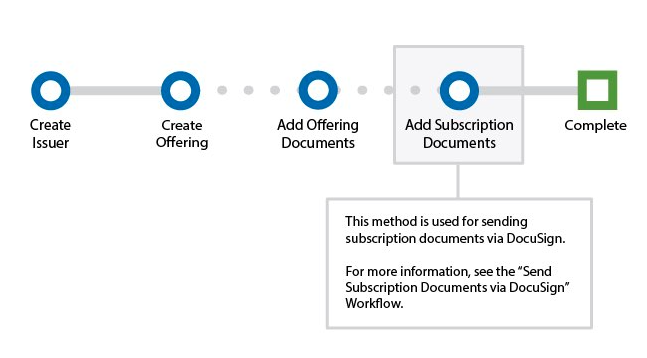
Steps
1. Create the issuer
Create the company or sponsor that is raising capital with createIssuer. issuerName, firstName, lastName, and email are required; email must be a valid address.
curl -X PUT "$TAPI_HOST/v3/createIssuer" \
  -H "Authorization: Bearer $TAPI_CLIENT_ID:$TAPI_API_KEY" \
  -d issuerName="Example Company Inc." \
  -d firstName=Jane \
  -d lastName=Doe \
  -d email=jane.doe@example.com \
  -d phoneNumber=5555550100
{
  "statusCode": "101",
  "statusDesc": "Ok",
  "issuerDetails": [
    true,
    [
      {
        "issuerId": "123456",
        "issuerStatus": "Pending"
      }
    ]
  ]
}
Keep issuerId. You need it to create offerings for this issuer.
2. Create the offering
Create the raise with createOffering. These fields are required: issuerId, issueName, targetAmount, minAmount, maxAmount, unitPrice, startDate, endDate, offeringText, and stampingText.
issueTypeis not validated, but use one ofEquity,Debt,Hybrid, orFundso the offering reports consistently.targetAmount,minAmount,maxAmount, andunitPricemust be numeric.maxAmountmust be greater than or equal totargetAmount, and greater thanminAmount.startDateandendDateuse the formatMM-DD-YYYY.stampingTextis the watermark applied to PDF offering documents, for exampleConfidential.
curl -X PUT "$TAPI_HOST/v3/createOffering" \
  -H "Authorization: Bearer $TAPI_CLIENT_ID:$TAPI_API_KEY" \
  -d issuerId=123456 \
  -d issueName="Example Company Seed Round" \
  -d issueType=Equity \
  -d targetAmount=1000000 \
  -d minAmount=1000 \
  -d maxAmount=1500000 \
  -d unitPrice=10 \
  -d startDate=10-01-2026 \
  -d endDate=03-31-2027 \
  -d offeringText="Seed round for Example Company" \
  -d stampingText=Confidential
{
  "statusCode": "101",
  "statusDesc": "Ok",
  "offeringDetails": [
    true,
    [
      {
        "offeringId": "12345",
        "offeringStatus": "Pending"
      }
    ]
  ]
}
Keep offeringId. Trades, offering documents, and subscription document templates all reference it.
3. Add offering documents (optional)
If you host offering materials, such as a private placement memorandum, in TransactAPI, upload them with addDocumentsforOffering. Files must be .pdf, .xls, or .docx, up to 50 MB. PDFs are watermarked with the offering's stampingText.
curl -X POST "$TAPI_HOST/v3/addDocumentsforOffering" \
  -H "Authorization: Bearer $TAPI_CLIENT_ID:$TAPI_API_KEY" \
  --form 'offeringId=12345' \
  --form 'documentTitle=documentTitle0=PPM' \
  --form 'documentFileReferenceCode=PPM-2026-01' \
  --form 'file_name=filename0=ppm.pdf' \
  --form 'userfile0=@"./ppm.pdf"'
{
  "statusCode": "101",
  "statusDesc": "Ok",
  "document_details": [
    {
      "offeringId": "12345",
      "documentId": "67890",
      "documentReferenceCode": "PPM-2026-01",
      "documentURL": "https://api-sandboxdash.norcapsecurities.com/tapiv3/index.php/stamp/PDF/..."
    }
  ]
}
Keep documentId if you will update or remove the document later. To upload several files in one request, see the multiple-upload example in the API Reference.
4. Add a subscription document template (optional)
If investors sign subscription documents through DocuSign, attach your DocuSign template to the offering with addSubscriptionsforOffering. This requires a linked DocuSign account (see Before You Start). fetchSubscriptionDocuments lists the template IDs available in your DocuSign account. file_name takes the template ID and template name, separated by --.
curl -X POST "$TAPI_HOST/v3/addSubscriptionsforOffering" \
  -H "Authorization: Bearer $TAPI_CLIENT_ID:$TAPI_API_KEY" \
  -d offeringId=12345 \
  -d "file_name=templatename0=YourTemplateID--Example Company Subscription Agreement"
{
  "statusCode": "101",
  "statusDesc": "Ok",
  "document_details": [
    {
      "templateNameID": "55591",
      "templateName": "Example Company Subscription Agreement",
      "offeringId": "12345"
    }
  ]
}
The template is sent to investors after they create a trade. See Subscription Documents.
5. Connect the escrow account
Creating an offering does not open an escrow bank account. When North Capital acts as escrow agent, North Capital escrow operations opens the escrow account for the offering and records its account number on the offering. The escrow account number cannot be set through createOffering or updateOffering. To start, see When creating an offering, how do I connect my escrow account? or contact your North Capital representative.
To confirm the account is connected, read the offering with GET /v3/offerings and check escrowAccountNumber:
curl -X GET "$TAPI_HOST/v3/offerings?filter[offeringId]=12345" \
  --globoff \
  -H "Authorization: Bearer $TAPI_CLIENT_ID:$TAPI_API_KEY"
{
  "statusCode": "101",
  "statusDesc": "Ok",
  "offerings": [
    {
      "issuerId": "123456",
      "offeringId": "12345",
      "issueName": "Example Company Seed Round",
      "offeringStatus": "Pending",
      "escrowAccountNumber": "000012345678",
      "acceptingInvestments": "yes"
    }
  ],
  "pagination": {
    "totalRecords": 1,
    "startIndex": 0,
    "endIndex": 0
  }
}
escrowAccountNumber is empty until the escrow account is connected. acceptingInvestments becomes no if the offering's escrow account is later closed, and new trades for the offering are then refused. Once the account is connected, you can read its balances with the Escrow Balances beta endpoint.
Webhooks
createIssuer and createOffering do not send webhooks. Later changes to the offering, such as updateOffering, closeOffering, and cancelOffering, do. See Offerings in the webhook method reference.
Common Errors
| Code | Meaning here |
|---|---|
103 | The Client ID or API key is invalid or inactive. |
106 | A required field is missing or invalid. Error(s) names each field, for example a date not in MM-DD-YYYY format or a maxAmount lower than targetAmount. |
110 | Your API key lacks a field permission the method requires. Permission(s) required for mandatory field(s) lists them; contact North Capital support to enable them. |
133 | The issuerId passed to createOffering does not exist. |
138 | The offeringId passed to a document method does not exist. |
See Error Codes for the full list.
Next
Register Webhooks before you create investor records, so you receive events for everything that follows.