KYC/AML Verification
A KYC/AML check verifies an investor's identity (Know Your Customer) and screens their name against global watch lists (Anti-Money Laundering). TransactAPI runs the automated check in real time against the details stored on the party, and writes the result to the party's kycStatus and amlStatus. When the automated check does not pass, or when the investor is an entity that needs a Know Your Business review, you can request a manual review by North Capital.
Before You Start
- Create the party with Onboard Individuals or Onboard an Entity Party. The check uses the name, address, date of birth, and Social Security number (or EIN) stored on the party, so complete those fields first.
- Register a webhook if you want to be notified of status changes.
Billing
In production, each call to performKycAmlBasic, performKycAml, performAml, and requestKycAml is billed as a separate check, including a repeat call for the same party. Sandbox calls are not billed. If a call times out or the connection drops, read the stored result back with getKycAmlResponse or GET /v3/parties/{id} before you retry. See the Fee Schedule.
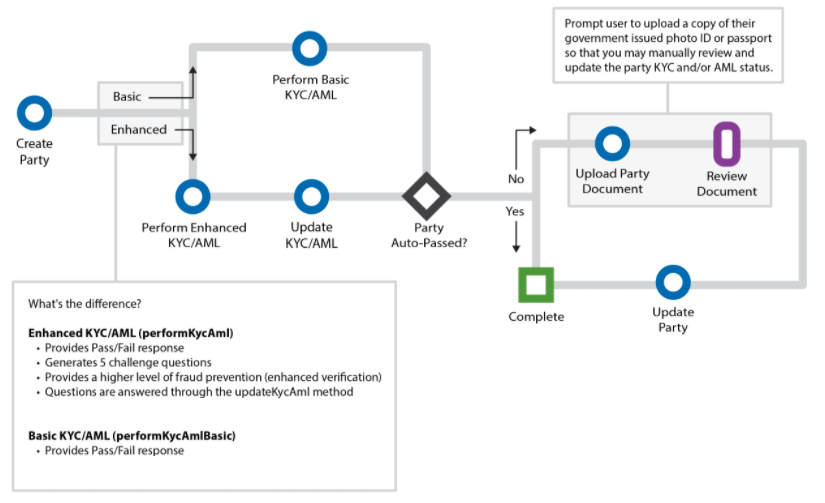
Basic or enhanced
Basic (performKycAmlBasic) | Enhanced (performKycAml) | |
|---|---|---|
| Result | Pass or fail | Pass or fail |
| Challenge questions | No | Yes, answered with updateKycAml |
getKycAmlResponse type | Basic | Enhanced |
Steps
1. Run the check
Call performKycAmlBasic for a basic check, or performKycAml for an enhanced check. Both take only the party ID.
curl -X POST "$TAPI_HOST/v3/performKycAmlBasic" \
  -H "Authorization: Bearer $TAPI_CLIENT_ID:$TAPI_API_KEY" \
  -d partyId=P12345
{
  "statusCode": "101",
  "statusDesc": "Ok",
  "kyc": {
    "response": {
      "id-number": "1234567890",
      "summary-result": { "key": "id.success", "message": "PASS" },
      "results": { "key": "result.match", "message": "ID Located" }
    },
    "kycstatus": "Auto Approved",
    "amlstatus": "Auto Approved"
  }
}
Keep kyc.kycstatus and kyc.amlstatus. Each check overwrites the party's kycStatus and amlStatus with its result:
kycstatusisAuto Approvedwhen the provider's summary result isPASS, andDisapprovedotherwise.amlstatusisDisapprovedwhen the provider reports a watch-list restriction or an error, andAuto Approvedotherwise.
For an enhanced check, also keep kyc.response.id-number and the questions in kyc.response.questions.question. Each question has a prompt, a type, and a list of answer choices.
{
  "statusCode": "101",
  "statusDesc": "Ok",
  "kyc": {
    "response": {
      "id-number": "1234567890",
      "summary-result": { "key": "id.success", "message": "PASS" },
      "questions": {
        "question": [
          {
            "prompt": "In which city is ANY STREET?",
            "type": "city.of.residence",
            "answer": ["ALMO", "ATLANTA", "MINOT", "None of the above"]
          }
        ]
      }
    },
    "kycstatus": "Auto Approved",
    "amlstatus": "Auto Approved"
  }
}
2. Submit the challenge answers (enhanced only)
Show the questions to the investor, then send the answers with updateKycAml. Pass the id-number as idNumber, the number of questions as noOfqns, and for each question n its type as type{n} and the chosen answer as qns{n}.
curl -X PUT "$TAPI_HOST/v3/updateKycAml" \
  -H "Authorization: Bearer $TAPI_CLIENT_ID:$TAPI_API_KEY" \
  -d partyId=P12345 \
  -d idNumber=1234567890 \
  -d noOfqns=5 \
  -d "type1=city.of.residence -d qns1=ATLANTA" \
  -d "type2=previous.address -d qns2="4344 BACKTRAIL DR"" \
  -d "type3=person.not.known -d qns3="SUSAN BROWN"" \
  -d "type4=property.size -d qns4="1,501 - 2,000"" \
  -d "type5=prior.residence.state.multiyear -d qns5="NEW YORK""
{
  "statusCode": "101",
  "statusDesc": "Ok",
  "Financial investor details": {
    "partyId": "P12345",
    "kycStatus": "Auto Approved"
  }
}
When the answers pass, kycStatus is Auto Approved. When they fail, the call returns HTTP 200 with statusCode 145, the provider's message in statusDesc, and the party's kycStatus is set to Disapproved. If the provider returns an error instead of a pass or fail, the call returns HTTP 404 with statusCode 145 and the party's kycStatus is left unchanged. Check statusCode, not only the HTTP status.
3. Screen an entity (entities only)
For an entity party, call performAml to screen the entity name against watch lists. This check is required on entities when North Capital is the escrow agent for your offering.
curl -X POST "$TAPI_HOST/v3/performAml" \
  -H "Authorization: Bearer $TAPI_CLIENT_ID:$TAPI_API_KEY" \
  -d partyId=E12345
{
  "statusCode": "101",
  "statusDesc": "Ok",
  "partyDetails": {
    "response": {
      "id-number": "1234567890",
      "restriction": { "key": "global.watch.list.no.match", "message": "Patriot Act - No Match" }
    },
    "amlStatus": "Auto Approved"
  }
}
Keep partyDetails.amlStatus.
4. Read the stored result
Call getKycAmlResponse to read the most recent stored result of a check without running it again. Set type to Basic (performKycAmlBasic), Enhanced (performKycAml), or AML Only (performAml). Use this before retrying a check.
curl -X POST "$TAPI_HOST/v3/getKycAmlResponse" \
  -H "Authorization: Bearer $TAPI_CLIENT_ID:$TAPI_API_KEY" \
  -d partyId=P12345 \
  -d type=Basic
{
  "statusCode": "101",
  "statusDesc": "Ok",
  "createdAt": "2026-01-15 09:21:47",
  "kycamlDetails": {
    "statusCode": "101",
    "statusDesc": "Ok",
    "kyc": {
      "response": {
        "id-number": "1234567890",
        "summary-result": { "key": "id.success", "message": "PASS" }
      },
      "kycstatus": "Auto Approved",
      "amlstatus": "Auto Approved"
    }
  }
}
kycamlDetails holds the stored response of the check and createdAt shows when it ran. The results of updateKycAml are not stored here; read the party's current status with GET /v3/parties/{id} or getKycAml.
5. Request a manual review (if needed)
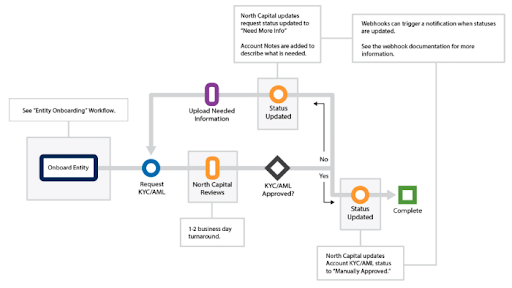
If the automated check does not pass, or an entity needs a Know Your Business review, call requestKycAml. investorId takes a party ID (P…), entity ID (E…), or account ID (A…). A party can have only one manual request.
For entities, the review looks through the organization documents to the beneficial owners (see FinCEN guidance). Upload all entity documents with uploadEntityDocument before requesting the review. For individuals, upload a government-issued photo ID with uploadPartyDocument.
curl -X POST "$TAPI_HOST/v3/requestKycAml" \
  -H "Authorization: Bearer $TAPI_CLIENT_ID:$TAPI_API_KEY" \
  -d investorId=P12345
{
  "statusCode": "101",
  "statusDesc": "Ok",
  "requestDetails": [
    { "investorId": "P12345", "requestId": "123456789" }
  ]
}
Keep requestId. North Capital reviews the request and sets the status to Manually Approved, Disapproved, or Needs More Info. When more information is needed, upload the documents and call updateKycAmlStatus with status New Info Added so the review continues.
Webhooks
These methods send webhooks. See KYC/AML and Accreditation for the payload of each.
performKycAmlBasicandperformKycAmlfire when the check completes, withpartyId,kycstatus, andamlstatus.performAmlfires when the entity screening completes.updateKycAmlfires only when the answers pass, withpartyIdandkycStatus. A failed or errored answer submission sends no webhook, so check the response.updateKycAmlRequestfires when North Capital sets a party toNeeds More Infoduring a manual review, andupdateKycAmlStatusfires when a status is changed in the Transact Portal.
requestKycAml itself sends no webhook; the review outcome arrives through the status webhooks above.
Common Errors
See Error Codes for the full list.
| Code | When |
|---|---|
106 | partyId is missing, or getKycAmlResponse has a missing or invalid type. |
198 | The party does not exist or is not active. requestKycAml also returns 198 with Request already in progress or Already requested when a manual request exists. |
145 | updateKycAml answers failed (HTTP 200) or the provider returned an error (HTTP 404). |
404 | getKycAmlResponse found no stored result of that type for the party. |
110 | The API key lacks permission for the method or a required field. |
Next
If the offering requires it, continue to Suitability or Accredited Investor Verification. Otherwise continue to Create the Trade.