Accredited Investor Verification
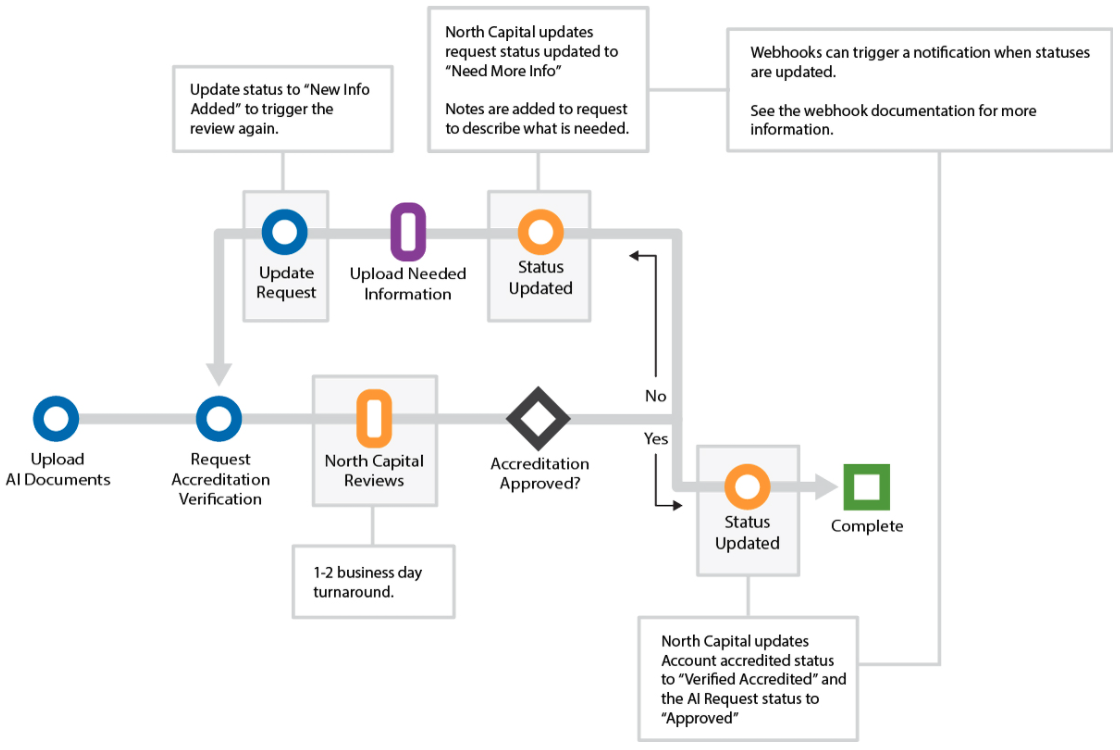
Offerings under Regulation D Rule 506(c) require the issuer to take reasonable steps to verify that each investor is accredited. North Capital offers this verification as an optional service. You upload the investor's documents to the account and request a review; a North Capital registered representative approves the request, rejects it, or asks for more information.
Before You Start
- Create the account and link it to the investor with Onboard Investors. Accreditation is verified per account.
- Collect one of the following from the investor:
- W-2s, 1099s, or tax returns for the past two years showing individual income over $200,000 (or joint income over $300,000) in each year.
- Recent account statements or third-party appraisals, dated within the last three months, showing assets over $1,000,000 excluding the primary residence.
- A letter dated within the last three months from a licensed CPA, attorney, investment adviser, or registered broker-dealer stating a reasonable belief that the investor is accredited.
- Note that an account can have only one verification request. Upload the documents before you request verification, and use
updateAiRequestfor later changes. - In production, each
requestAiVerificationcall is billed. See the Fee Schedule.
Steps
1. Upload the verification documents
Call uploadVerificationDocument once per file, as a multipart/form-data request with the file in userfile. accountId and documentTitle are required. Files must be PDF, JPG, JPEG, PNG, or TXT and larger than 1 KB.
curl -X POST "$TAPI_HOST/v3/uploadVerificationDocument" \
  -H "Authorization: Bearer $TAPI_CLIENT_ID:$TAPI_API_KEY" \
  -F accountId=A12345 \
  -F documentTitle="2025 W-2" \
  -F userfile=@/path/to/w2-2025.pdf
{
  "statusCode": "101",
  "statusDesc": "Ok",
  "document_details": "Document has been uploaded Successfully"
}
A 101 confirms the upload. Repeat for each document.
2. Request verification
Call requestAiVerification with the account ID and aiMethod set to Upload. Both are required; notes is optional and is shown to the reviewer.
curl -X POST "$TAPI_HOST/v3/requestAiVerification" \
  -H "Authorization: Bearer $TAPI_CLIENT_ID:$TAPI_API_KEY" \
  -d accountId=A12345 \
  -d aiMethod=Upload \
  -d notes="Income verification, two years of W-2s"
{
  "statusCode": "101",
  "statusDesc": "Ok",
  "accreditedDetails": [
    {
      "accountId": "A12345",
      "aiRequestStatus": "Pending",
      "airequestId": "a1B2c3",
      "notes": "Income verification, two years of W-2s",
      "accreditedStatus": "Pending"
    }
  ]
}
Keep airequestId. You need it to update the request.
3. Track the review
North Capital sets the request status as the review progresses, and each change sends the updateAiVerification webhook. To read the current state, call getAiRequest with the account ID. The reviewer's notes describe any further documents needed.
curl -X POST "$TAPI_HOST/v3/getAiRequest" \
  -H "Authorization: Bearer $TAPI_CLIENT_ID:$TAPI_API_KEY" \
  -d accountId=A12345
{
  "statusCode": "101",
  "statusDesc": "Ok",
  "accreditedDetails": {
    "request": [
      {
        "airequestId": "a1B2c3",
        "accountId": "A12345",
        "aiMethod": "Upload",
        "aiRequestStatus": "Need More Info",
        "notes": "Please provide the 2024 W-2.",
        "accreditedStatus": "Pending"
      }
    ]
  }
}
Keep aiRequestStatus, notes, and accreditedStatus.
4. Respond to a request for more information
When the status is Need More Info, upload the requested documents with uploadVerificationDocument (step 1), then call updateAiRequest with aiRequestStatus set to New Info Added so the review continues. To ask for a new letter after a review was completed, send Updated Letter Requested.
curl -X POST "$TAPI_HOST/v3/updateAiRequest" \
  -H "Authorization: Bearer $TAPI_CLIENT_ID:$TAPI_API_KEY" \
  -d airequestId=a1B2c3 \
  -d aiRequestStatus="New Info Added"
{
  "statusCode": "101",
  "statusDesc": "Ok",
  "accreditedDetails": [
    {
      "accountId": "A12345",
      "aiRequestStatus": "New Info Added",
      "airequestId": "a1B2c3",
      "accreditedStatus": "Pending"
    }
  ]
}
airequestId and aiRequestStatus are both required. The response returns the request's new aiRequestStatus and the account's accreditedStatus.
Test in the Sandbox
In the sandbox you can simulate a reviewer's decision. Upload a document with uploadVerificationDocument and set its documentTitle to one of the test titles below, then call requestAiVerification. In the Transact Portal, enter the test title in the Document Title field. The uploaded file itself can have any name.
The sandbox checks the title of the most recently uploaded verification document. Matching is exact and case-insensitive; any other title leaves the request Pending.
documentTitle | aiRequestStatus | allow |
|---|---|---|
Test_Need_Info.pdf | Need More Info | Pending |
Test_Approved_Assets.pdf | Approved | Assets |
Test_Approved_Income.pdf | Approved | Income |
Test_Approved_All.pdf | Approved | All Parties Accredited |
Test_Rejected.pdf | Rejected | Pending |
Test_Letter.pdf | Approved | Assets |
Test_Letter.pdf also generates an accreditation verification letter, which you can retrieve with getAiLetter.
Test titles work only in the sandbox. In production, every request is reviewed by a registered representative of North Capital.
Statuses
The request's aiRequestStatus is set by the review (updateAiVerification) or by you (updateAiRequest). Two values also change the account's accreditedStatus:
aiRequestStatus | Set by | Effect on accreditedStatus |
|---|---|---|
Pending | requestAiVerification | None |
Need More Info | North Capital | None |
New Info Added | You, after uploading more documents | None |
Updated Letter Requested | You, to request a new letter | None |
Approved | North Capital | Set to Verified Accredited |
Rejected | North Capital | Set to Not Accredited |
The account's accreditedStatus is one of Pending, Self Accredited, Verified Accredited, or Not Accredited. Read it with GET /v3/accounts/{id}.
Webhooks
These methods send webhooks. See KYC/AML and Accreditation for the payloads.
uploadVerificationDocumentfires for each uploaded document, withaccountId.requestAiVerificationfires when the request is created.updateAiVerificationfires when North Capital changes the request status during review.updateAiRequestfires when you update the request.
Common Errors
See Error Codes for the full list.
| Code | When |
|---|---|
106 | A required field is missing (accountId, aiMethod, documentTitle, airequestId, or aiRequestStatus), or the uploaded file is 1 KB or smaller. |
140 | The uploaded file is not PDF, JPG, JPEG, PNG, or TXT. |
148 | The account does not exist or is not active. |
150 | The account already has a verification request. Use updateAiRequest instead. |
152 | The airequestId does not exist for your client. |
Next
Continue to Create the Trade.