Onboard Entities
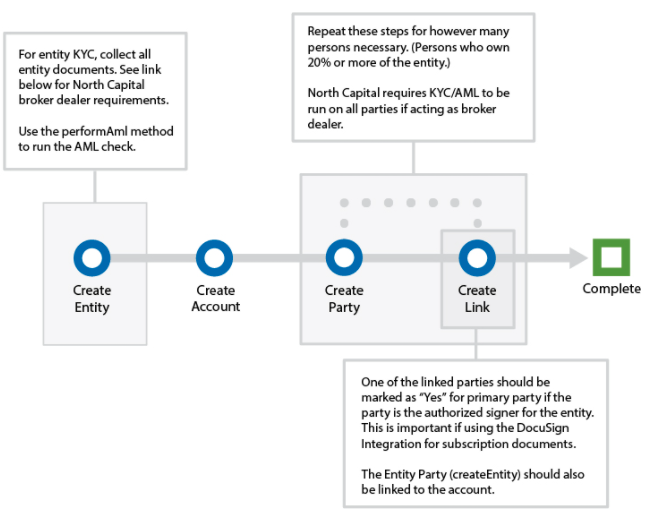
An entity investor is a legal entity such as a trust, LLC, corporation, or partnership. You create an entity party for the organization, an account for the investment, individual parties for the people who control the entity, and links that connect all of them to the account. One of those individuals is the primary party who signs for the entity.
Before You Start
- You have completed Onboard Individuals at least once; the party, account, and link calls here use the same fields.
- An offering exists. See Set Up an Offering.
- Webhooks are registered for
createParty,createAccount, andcreateLinkif you want event notifications. See Register Webhooks. - You know which individuals control or own the entity. When North Capital acts as broker-dealer, KYC/AML is required on every party linked to the account. Which individuals to link (beneficial owners and the authorized signer) depends on your compliance program.
Steps
1. Create the entity party
Create a party for the organization.
Required: entityName, primAddress1, primCity (no digits), primState (two-letter code, or NOUS outside the U.S.; not required when domicile is non-resident), primZip, primCountry, and emailAddress (must be a valid address). Optional fields include domicile, entityType (for example Revocable Trust, Irrevocable Trust, Limited Partnership, LLC, or Corporation), ein, and formationDate (MM-DD-YYYY).
curl -X PUT "$TAPI_HOST/v3/createEntity" \
  -H "Authorization: Bearer $TAPI_CLIENT_ID:$TAPI_API_KEY" \
  -d "domicile=U.S. citizen" \
  -d "entityName=Smith Family Trust" \
  -d "entityType=Revocable Trust" \
  -d "ein=00-0000000" \
  -d "primAddress1=100 Main Street" \
  -d "primCity=Atlanta" \
  -d "primState=GA" \
  -d "primZip=30318" \
  -d "primCountry=USA" \
  -d "emailAddress=trust@example.com"
Keep entityDetails[1][0].partyId. Entity IDs start with E. See createEntity.
2. Create the account
Create the account in the entity's name with type=Entity, and set entityType to match the entity. The other required fields are the same as for an individual account; see Onboard Individuals, step 2.
curl -X PUT "$TAPI_HOST/v3/createAccount" \
  -H "Authorization: Bearer $TAPI_CLIENT_ID:$TAPI_API_KEY" \
  -d "accountRegistration=Smith Family Trust" \
  -d "type=Entity" \
  -d "entityType=Revocable Trust" \
  -d "domesticYN=domestic_account" \
  -d "streetAddress1=100 Main Street" \
  -d "city=Atlanta" \
  -d "state=GA" \
  -d "zip=30318" \
  -d "country=USA" \
  -d "KYCstatus=Pending" \
  -d "AMLstatus=Pending" \
  -d "AccreditedStatus=Pending" \
  -d "approvalStatus=Pending"
{
  "statusCode": "101",
  "statusDesc": "Ok",
  "accountDetails": [
    {
      "accountId": "A12345",
      "kycStatus": "Pending",
      "amlStatus": "Pending",
      "accreditedStatus": "Pending",
      "approvalStatus": "Pending"
    }
  ]
}
Keep accountDetails[0].accountId.
3. Create a party for each controlling person
Call createParty for each individual who controls or owns the entity, such as trustees, managers, officers, and beneficial owners. The request is the same as Onboard Individuals, step 1.
curl -X PUT "$TAPI_HOST/v3/createParty" \
  -H "Authorization: Bearer $TAPI_CLIENT_ID:$TAPI_API_KEY" \
  -d "domicile=U.S. citizen" \
  -d "firstName=Jane" \
  -d "lastName=Smith" \
  -d "dob=03-24-1980" \
  -d "primAddress1=100 Main Street" \
  -d "primCity=Atlanta" \
  -d "primState=GA" \
  -d "primZip=30318" \
  -d "primCountry=USA" \
  -d "emailAddress=jane.smith@example.com"
{
  "statusCode": "101",
  "statusDesc": "Ok",
  "partyDetails": [true, [{ "partyId": "P12345", "KYCstatus": "", "AMLstatus": "" }]]
}
Keep each partyId.
4. Link the entity to the account
Link the entity party to the account with relatedEntryType=EntityACParty. Do not set primary_value on this link; only an individual party can be primary.
curl -X PUT "$TAPI_HOST/v3/createLink" \
  -H "Authorization: Bearer $TAPI_CLIENT_ID:$TAPI_API_KEY" \
  -d "firstEntryType=Account" \
  -d "firstEntry=A12345" \
  -d "relatedEntryType=EntityACParty" \
  -d "relatedEntry=E12345" \
  -d "linkType=owner"
5. Link the controlling persons to the account
Link each individual with relatedEntryType=IndivACParty and the linkType that describes their role, for example trustee, manager, member, officer, or director. Set primary_value=1 on exactly one link: the person authorized to sign for the entity, who receives subscription documents.
curl -X PUT "$TAPI_HOST/v3/createLink" \
  -H "Authorization: Bearer $TAPI_CLIENT_ID:$TAPI_API_KEY" \
  -d "firstEntryType=Account" \
  -d "firstEntry=A12345" \
  -d "relatedEntryType=IndivACParty" \
  -d "relatedEntry=P12345" \
  -d "linkType=trustee" \
  -d "primary_value=1"
Repeat for each additional person with primary_value=0. See createLink for all linkType values.
6. Confirm the records (optional)
Read the entity back from the entity list, and list the account's links to confirm the entity and every person are attached.
curl -X GET "$TAPI_HOST/v3/entities?filter[partyId]=E12345" \
  --globoff \
  -H "Authorization: Bearer $TAPI_CLIENT_ID:$TAPI_API_KEY"

curl -X GET "$TAPI_HOST/v3/links?filter[firstEntry]=A12345" \
  --globoff \
  -H "Authorization: Bearer $TAPI_CLIENT_ID:$TAPI_API_KEY"
{
  "statusCode": "101",
  "statusDesc": "Ok",
  "entities": [
    {
      "partyId": "E12345",
      "entityName": "Smith Family Trust",
      "entityType": "Revocable Trust",
      "primCountry": "USA"
    }
  ],
  "pagination": { "totalRecords": 1, "startIndex": 0, "endIndex": 0 }
}
GET /v3/parties/{id} returns individual parties only; use GET /v3/entities for entity parties. Individual parties and the account can be read with GET /v3/parties/{partyId} and GET /v3/accounts/{accountId} as in Onboard Individuals, step 4.
Verify the Entity and Its People
Run AML on the entity with performAml, and KYC/AML on each linked individual. Entity KYC (Know Your Business) requires the entity's organization documents. See KYC/AML Verification.
Webhooks
createEntitydoes not send a webhook. Use thecreateEntityresponse, or read the entity back as in step 6.createParty: once per individual. See Parties and Entities.createAccount: once for the account. See Accounts.createLink: once per link. See Links.
Common Errors
See Error Codes for the full list.
| Code | HTTP status | Cause |
|---|---|---|
106 | 404 | A required createEntity, createParty, or createAccount parameter is missing or invalid. The Error(s) field lists the fields. |
1400 | 400 | The link already exists, or firstEntry and relatedEntry are the same. |
1404 | 404 | The account, entity, or party ID in createLink does not exist for your client, or relatedEntryType does not match the ID (for example an E… ID sent as IndivACParty). |
1422 | 422 | primary_value=1 was sent on the entity link or on a second individual, or linkType is not a valid value. |
Next
Continue to Qualify Investors.