Settle and Manage
After investors have paid, each trade moves through the rest of its lifecycle: funds are held in escrow, the offering is closed, and funds are released to the issuer or returned to the investor. This step covers tracking trade statuses, closing an offering, and marking trades settled. To cancel an investment or return funds, see Refunds and Returns.
Trade Statuses
Trade statuses are separate from payment statuses. Payment statuses are described in Collect Payment.
| Status | Meaning |
|---|---|
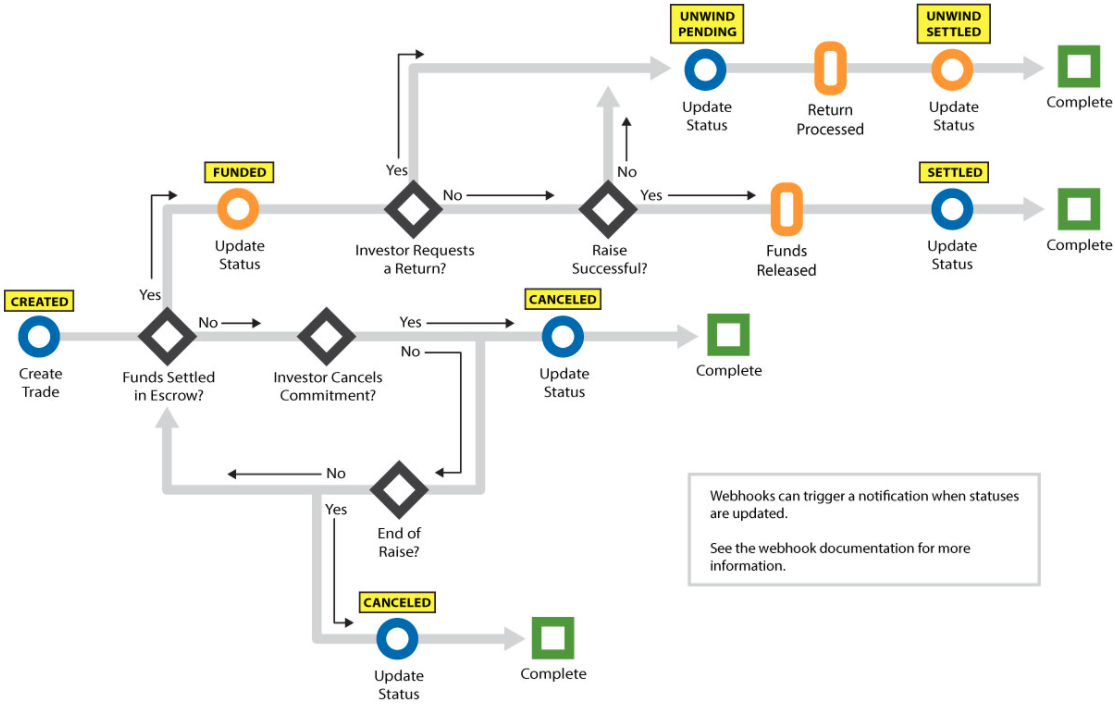
CREATED | The trade exists and funds have not yet been received in escrow. |
FUNDED | Funds have been received in escrow. |
CANCELED | Funds were never received in escrow and the investment was canceled, with deleteTrade or cancelInvestment. |
UNWIND PENDING | Funds were received in escrow and a return to the investor's bank account is pending. |
UNWIND SETTLED | Funds were received in escrow and the return to the investor's bank account has been processed. |
SETTLED | Funds have been released from escrow to the issuer's bank account. |
The diagram shows how a trade moves between these statuses.
Before You Start
- Trades have been created for the offering. See Create the Trade.
- Payments have been collected. See Collect Payment.
- Webhooks are registered for
updateTradeStatusandcloseOffering. See Register Webhooks.
Steps
1. Review the offering's trades
List the offering's trades to confirm every trade has reached a status that allows the offering to close.
curl -X GET "$TAPI_HOST/v3/trades?filter[offeringId]=12345&limit=500" \
  --globoff \
  -H "Authorization: Bearer $TAPI_CLIENT_ID:$TAPI_API_KEY"
{
  "statusCode": "101",
  "statusDesc": "Ok",
  "trades": [
    {
      "tradeId": "123456",
      "accountId": "A12345",
      "offeringId": "12345",
      "partyId": "P12345",
      "transactionType": "ACH",
      "totalAmount": "12345.00",
      "tradeStatus": "FUNDED",
      "eligibleToClose": "no"
    }
  ],
  "pagination": {
    "totalRecords": 1,
    "startIndex": 0,
    "endIndex": 0
  }
}
Check tradeStatus on each trade. Trades still in CREATED or UNWIND PENDING block the close in the next step. See Working with List Endpoints for filters and paging.
2. Close the offering
Call closeOffering once all funding activity for the offering is complete. Every trade on the offering must be FUNDED, SETTLED, UNWIND SETTLED, CANCELED, or REJECTED. Closing the offering does not change any trade status.
curl -X POST "$TAPI_HOST/v3/closeOffering" \
  -H "Authorization: Bearer $TAPI_CLIENT_ID:$TAPI_API_KEY" \
  -d offeringId=12345
OfferID confirms which offering was closed. See POST /v3/closeOffering.
3. Mark trades settled
After the funds for a trade have been released from escrow to the issuer, set the trade to SETTLED with updateTradeStatus. tradeId and accountId identify the trade. Send only the fields you want to change; omitting orderStatus leaves the status as it is.
curl -X POST "$TAPI_HOST/v3/updateTradeStatus" \
  -H "Authorization: Bearer $TAPI_CLIENT_ID:$TAPI_API_KEY" \
  -d tradeId=123456 \
  -d accountId=A12345 \
  -d orderStatus=SETTLED
{
  "statusCode": "101",
  "statusDesc": "Ok",
  "tradeDetails": [
    {
      "partyId": "P12345",
      "offeringId": "12345",
      "orderStatus": "SETTLED",
      "RRApprovalStatus": "Approved",
      "PrincipalApprovalStatus": "Approved",
      "closeId": null,
      "eligibleToClose": "yes"
    }
  ]
}
orderStatus in tradeDetails is the trade's status after the update. The value you send is stored as given, so send statuses in upper case exactly as listed in Trade Statuses. See POST /v3/updateTradeStatus.
Webhooks
updateTradeStatusfires each time a trade's status or approval fields change, including changes made by North Capital and bycancelInvestment. It is not sent when the update leaves the trade unchanged.closeOfferingfires when the offering is closed, withofferingStatusset toCLOSED.updateEligibleToCloseStatusfires when an offering's escrow status changes to Eligible to Close.
See Trades and Offerings in the Webhooks method reference for the payload fields.
Common Errors
| Code | When it happens here |
|---|---|
186 | closeOffering was called while at least one trade is still CREATED or UNWIND PENDING. |
138 | The offering does not exist or is already closed. |
135 | The accountId sent to updateTradeStatus does not exist or is not active. |
189 | The tradeId does not exist. |
106 | A required parameter is missing. |
See Error Codes for the full list.
Next
To cancel an investment or return funds to an investor, continue to Refunds and Returns.